
SearchCtrl K
The Mailbox Intraday Report shows a real-time summary of emails that are waiting to be worked, grouped by queue.
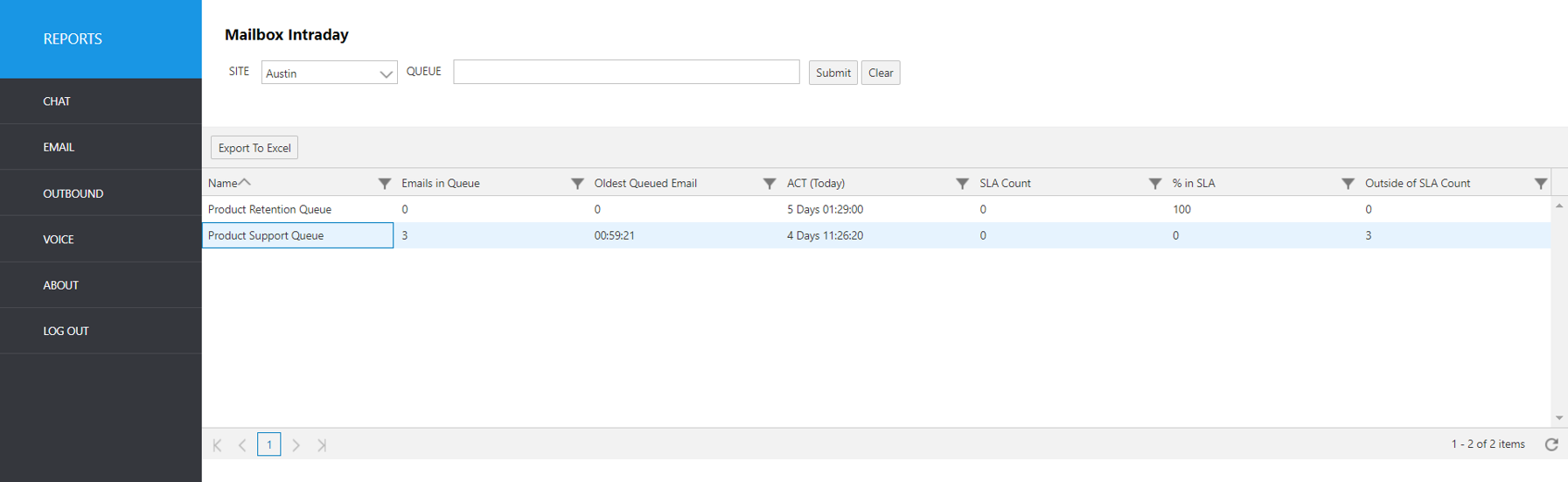
Select the following items to query, then click submit:
Site: Select site.
Queue: Select the mailbox queue.
The output shows the following summary data:
Report Heading | Description |
|---|---|
Name | Name of mailbox queue. |
Emails in Queue | Number of emails waiting in queue. |
Oldest Queued Email | Total length of time the oldest email has been in queue. |
ACT (Today) | Average Close Time. |
SLA Count | Total count of items that are within the desired SLA and those that are out of SLA, grouped by queue. |
% in SLA | Percent of total emails that are within the desired SLA. |
Outside of SLA Count | Count of emails that are waiting longer than the desired SLA Minutes. |