
The Call List Disposition Report displays a summary of completed call list items by list within the selected criteria. The results can be expanded to show a summary by disposition. Expand again to show the call list items that are included within the summary.
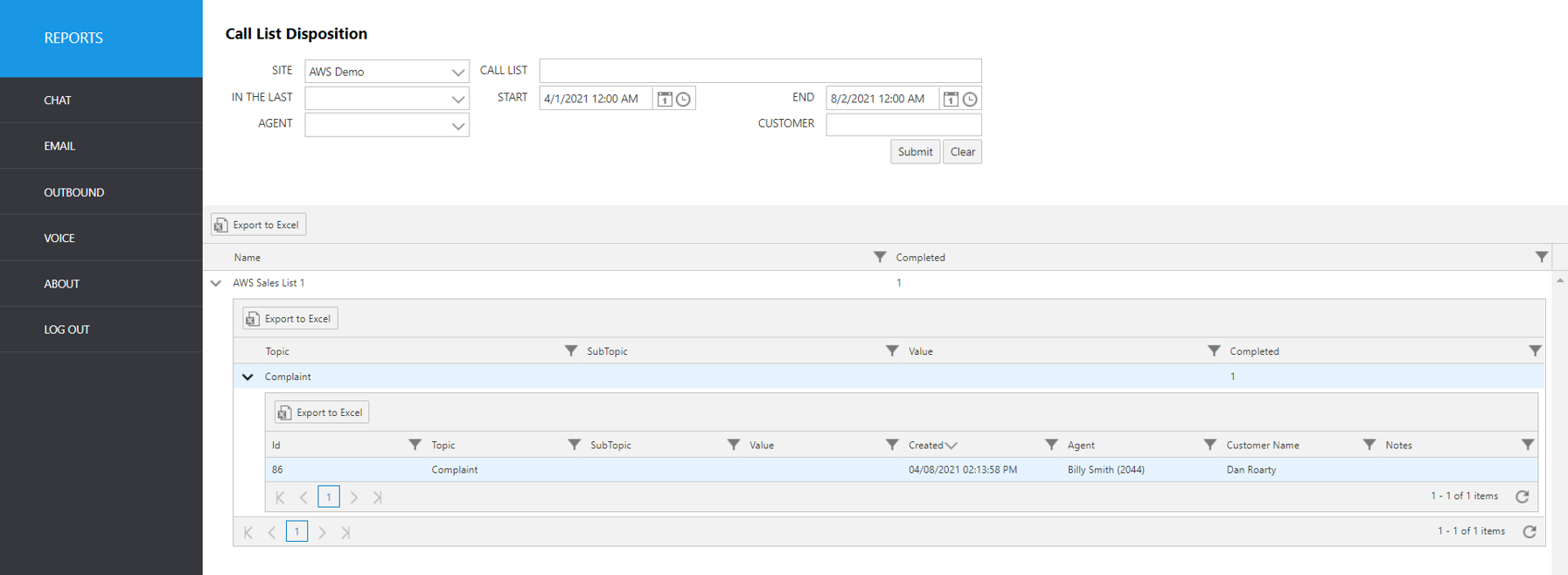
Select the following items to query, then click submit:
Site: Select site.
Call List: Select the call list.
In The Last: Select a time frame to automatically fill the Start and End date/time.
Start: Use this to enter an exact start date/time.
End: Use this to enter an exact end date/time.
Agent: Select an agent username from the pulldown list.
Customer: Enter the customer’s first or last name (full or partial).
The initial output shows the following summary data:
Report Heading | Description |
|---|---|
Name | Name of call list. |
Completed | Number of calls completed from the call list. |
To view additional disposition data, click the up arrow to the left of the record you wish to expand.
Report Heading | Description |
|---|---|
Topic | Disposition topic description. (The first level of disposition codes selected) |
SubTopic | Disposition subtopic description. (The second level of disposition codes selected) |
Value | Disposition value (The third level of disposition codes selected) |
Completed | Count of items completed for the disposition topic/subtopic/value combination within your selected criteria |
To see details of the call list items that are included in the Topic-level summary, click the up arrow to the left of the topic you wish to expand.
Report Heading | Description |
|---|---|
ID | Call List ID number |
Topic | The topic selected for the item |
Subtopic | The subtopic selected for the item |
Value | The value selected for the item |
Created | Date/time the item was created |
Agent | Name and agent ID (from Avaya CM) |
Customer Name | Customer Name |
Notes | Notes added to the record by the agent |