
The Chat Agent Summary report provides a summary of chat interactions by Agent within the selected criteria. The results can be expanded to show additional details for each chat within the summary. Expand again to show the transcripts, event history, and notes for the selected chat.
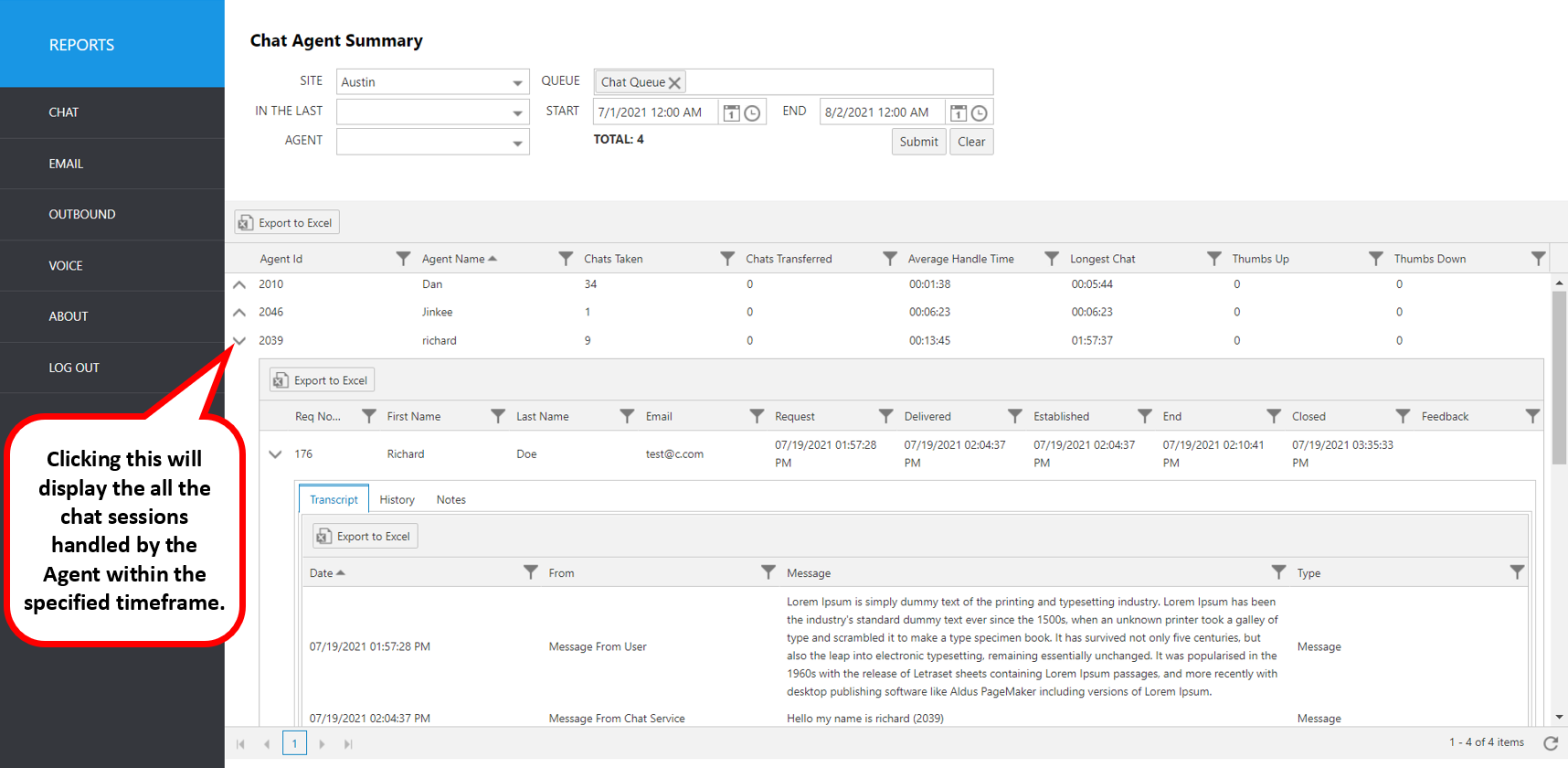
Select the following items to query, then click submit:
Site: Select site.
Queue: Select the queue.
In The Last: Select a time frame to automatically fill the Start and End date/time.
Agent: Select an agent username from the pulldown list.
Start: Use this to enter an exact start date/time.
End: Use this to enter an exact end date/time.
The initial output shows the following summary data:
Report Heading | Description |
|---|---|
Agent ID | Agent ID number (from Avaya CM). |
Agent Name | Agent name (from Avaya CM). |
Chats Taken | Number of chats answered by agent. |
Chats Transferred | Number of chats transferred to other chat queues or agents. |
Average Handle Time | Average time to answer and close a chat item. |
Longest Chat | Longest chat time held by the agent. |
Thumbs Up | Count of Thumbs Up responses given in chat. |
Thumbs Down | Count of Thumbs Down responses given in chat. |
To view Chat sessions for each Agent, click the up arrow to the left of the record you wish to expand.
Agent Details | Description |
|---|---|
Req No | Chat ID in CT Suite system. |
First Name | User’s first name. |
Last Name | User’s last name. |
User’s email address. | |
Request | The date/time when the initial chat work item request was submitted by the customer. |
Delivered | The date/time when the chat work item was delivered to the agent. |
Established | The date/time when the chat work item was acknowledged (answered) by the agent. |
End | The date/time when the chat work item ended. |
Closed | The date/time when the chat work item closed. |
Feedback | Comments or review by user. |
To view individual chat details, click the up arrow to expand again to the detail level.
Resulting screen tabs: Transcript, History, Notes.
The following items can be viewed for each chat.
Transcript details | Description |
|---|---|
Date | Date/Time of transcript event |
From | Agent or user who initiated the transcript event. |
Message | Actual message transcript of the chat session |
History details | Description |
|---|---|
Date | Date/Time of chat session events |
Author | Agent or user who authored the event. |
Message | Event log of chat session. Example: Chat Created, Chat Ended |
Notes details | Description |
|---|---|
Date | Date/Time note was written |
Author | Agent or user who authored the event. |
Message | Actual text of the note added during dispositioning |