
The Call List Details Report shows a summary of completed call list items by list within the selected criteria. The results can be expanded to show the call list records that are included within the summary.
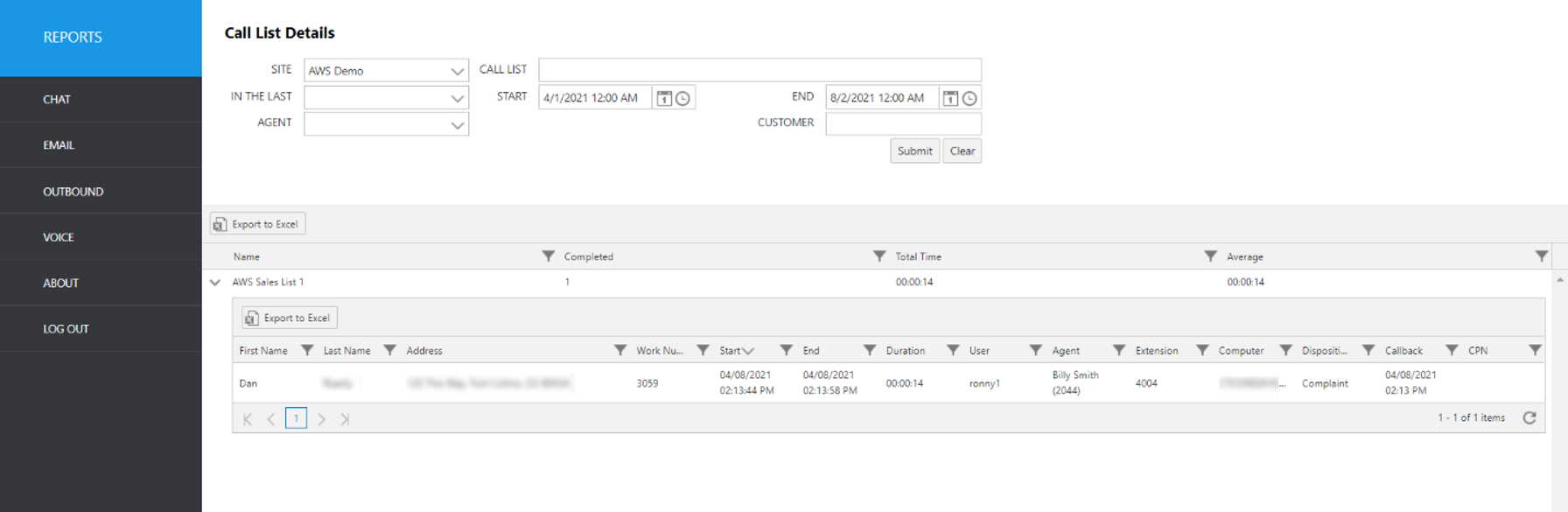
Select the following items to query, then click submit:
Site: Select site.
Call List: Select the call list.
In The Last: Select a time frame to automatically fill the Start and End date/time.
Start: Use this to enter an exact start date/time.
End: Use this to enter an exact end date/time.
Agent: Select an agent username from the pulldown list.
Customer: Enter the customer’s first or last name (full or partial).
The initial output shows the following summary data:
Report Heading | Description |
|---|---|
Name | Name of call list. |
Completed | Number of calls completed from the call list. |
Total Time | Total length of time for calls completed. |
Average | Average length of time for calls completed. |
To view additional event data, click the up arrow to the left of the record you wish to expand.
Report Heading | Description |
|---|---|
First Name | Customer first name. |
Last Name | Customer last name. |
Address | Customer address. |
Work Number | Customer work number. |
Start | Start time of call. |
End | End time of call. |
Duration | Duration of call. |
User | Agent’s name. |
Extension | Agent’s extension. |
Computer | Agent’s computer name. |
Disposition | Disposition of call. |
Callback | Date/time callback was scheduled |
CPN | CPN selected when dialing out |