
The Email Agent report provides a summary of email interactions by agent within the selected criteria. The results can be expanded to show additional details for each email within the summary. Expand again to show the email details and event history for the selected email.
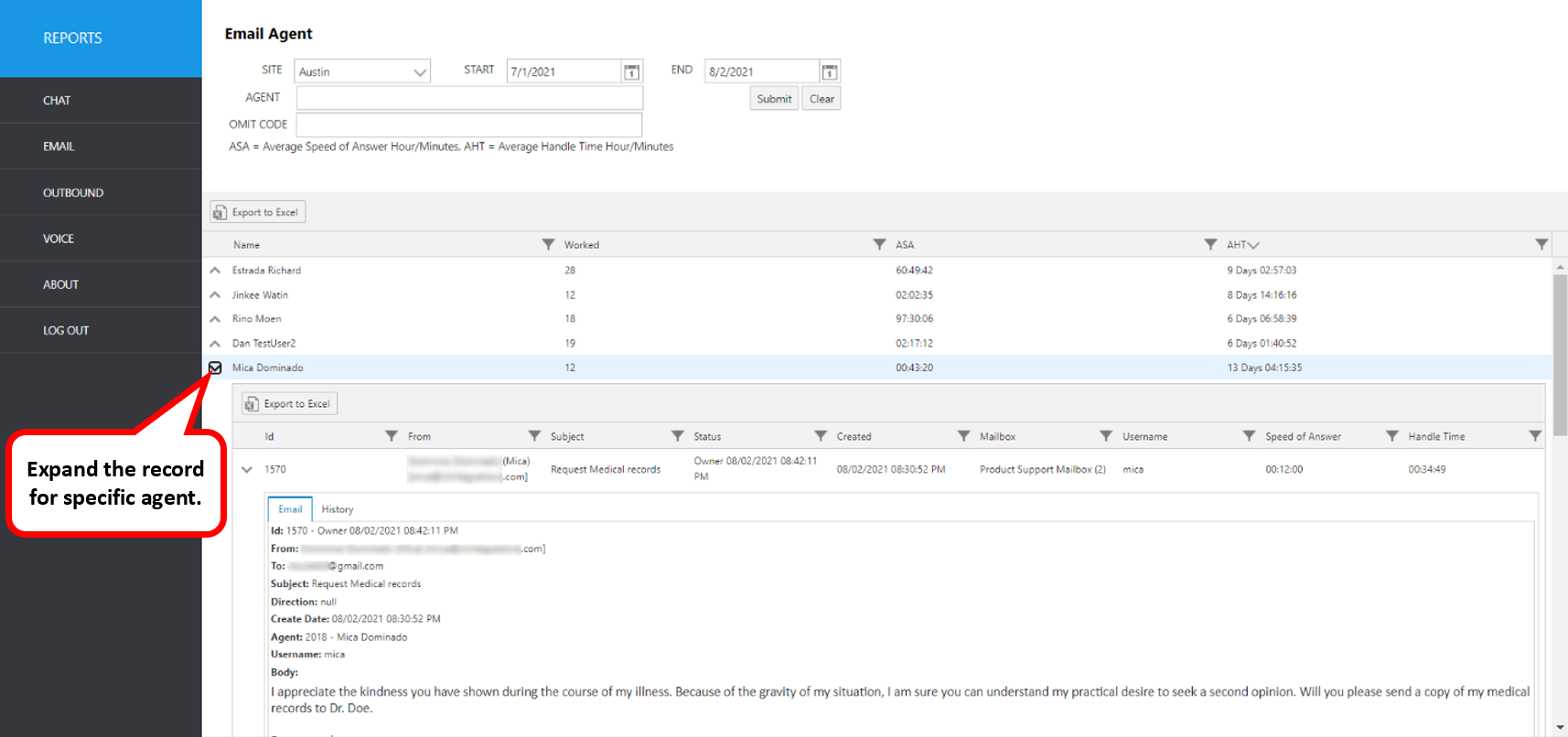
Select the following items to query, then click submit:
Site: Select site
Agent: Select an agent username from the pulldown list
Start: Use this to enter an exact start date
End: Use this to enter an exact end date
Omit Code: Select any disposition(s) to exclude data from the report
The initial output shows the following summary data:
Report Heading | Description |
|---|---|
Name | Name of the Agent |
Worked | Count of emails worked for the criteria selected |
ASA | Average Speed of Answer Speed of Answer for email is the amount of time between when the email was created in CT Suite and when the email arrives in an agent inbox regardless of whether the email was queued or manually retrieved. |
AHT | Average Handle Time Handle Time is the accumulation of time an email has been in any agent inbox. Handle time is not accumulated while an email is suspended or closed, but it will begin to accumulate again if it is moved back to any agent's inbox. |
To view the emails included in the summary data, click the up arrow to the left of the record you wish to expand.
Report Heading | Description |
|---|---|
ID | Email ID number |
From | Incoming email address |
Subject | Email subject line |
Status | State of the email at the time the report was produced* |
Created | Email create date/time |
Mailbox | Mailbox name |
User Name | The agent’s Windows username |
Speed of Answer | Actual speed of answer for the displayed work item |
Handle Time | Total handle time for the displayed work item |
*Email Status Definitions are here
To view more details, click the up arrow to the left of the record you wish to expand. It will expand to show more information.
Resulting Screen tabs: Email, History
Click each tab to view details for each email ID.
The following items can be viewed for each email.
Email Tab Screen | Description |
|---|---|
ID | Email ID number |
From | Incoming email address |
To | Receiving email address |
Subject | Email subject line |
Direction | Email direction (i.e., inbound or outbound) |
Create Date | Email create date/time |
Username | The agent’s Windows user name |
Body | Agent ID and name (from Avaya CM) |
History Tab Screen | Description |
|---|---|
Status | State of the email during event |
Date | Date/time of event |
Description | Description of event |
Username | CT Suite username associated with event |
Agent | ACD Agent name and ID associated with event |
Type | Type of event i.e. “Historical” or “Note”. Historical events are recorded automatically and include date/time of email creation, assigned station, etc. Notes are also viewed here. Notes are manually written and saved by the agent by clicking the Notes tab in the CTWC Email. |