Widgets and Features
Title
Message
Create new category
What is the title of your new category?
Edit page index title
What is the title of the page index?
Edit category
What is the new title of your category?
Edit link
What is the new title and URL of your link?
Wrap up a chat
Copy Markdown
Open in ChatGPT
Open in Claude
Displays the page for selecting disposition topics, sub topics and notes if desired. This requires dispositions to be configured.
To wrap up a chat, select the Wrap Up tab. This will open up the wrap up options in place of the conversation.
Use the drop downs to select the desired topic and sub-topics, add notes if desired, and click the Save button.
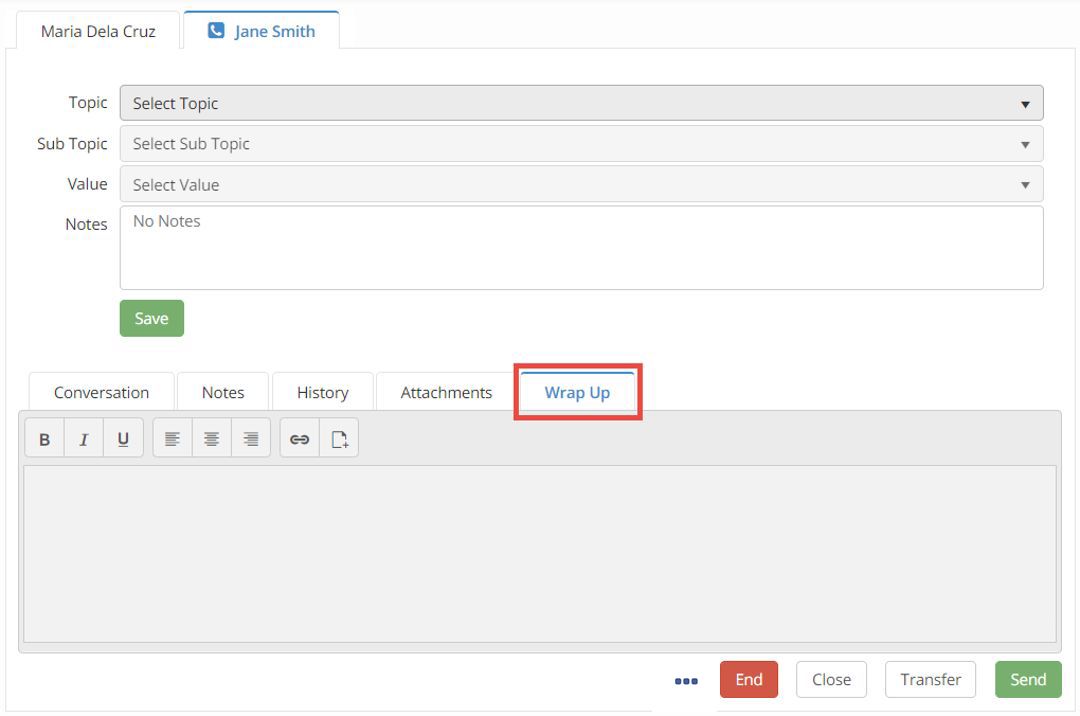
Chat Wrap Up can be configured as a mandatory step by your Administrator. One or all of the wrap up fields may be required in your environment.
Type to search, ESC to discard
Last updated on
Next to read:
Data MaskingCopyright @ 2021 Avaya Inc.
Discard Changes
Do you want to discard your current changes and overwrite with the template?
Archive Synced Block
Message
Create new Template
What is this template's title?
Delete Template
Message