
List View
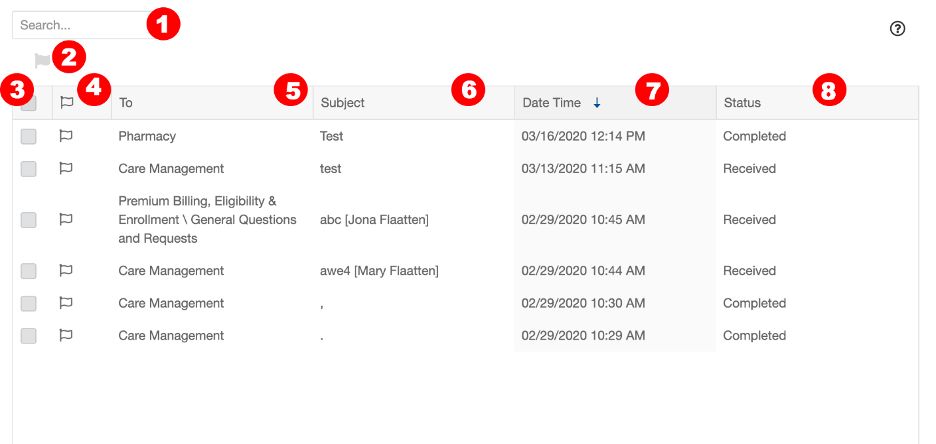
Search: Enter a keyword into the search field to search the emails in this folder.
Flag: When an email is selected using the checkbox, click the flag icon to flag the message.
Select: Clicking the checkbox in the header will select all messages that are visible in the list. To select a single message, click the checkbox to the left of that message.
Flag: Clicking the flag icon in the header will flag all messages that are visible in the list. To flag a single message, click the flag icon to the left of the message.
To: This column shows the topic.
Subject: This column shows the subject of the emails.
Date/time received: This column shows the date and time email was received. The email list is sorted by this column by default. You can click any column header to re-sort the messages. *
Status: This column shows the status of each sent email. It will either appear as Received, In Progress, or Completed.
*Clicking once will sort in ascending order, clicking a second time will sort in descending order, clicking a third time will remove the sort from the column.
Reading Pane
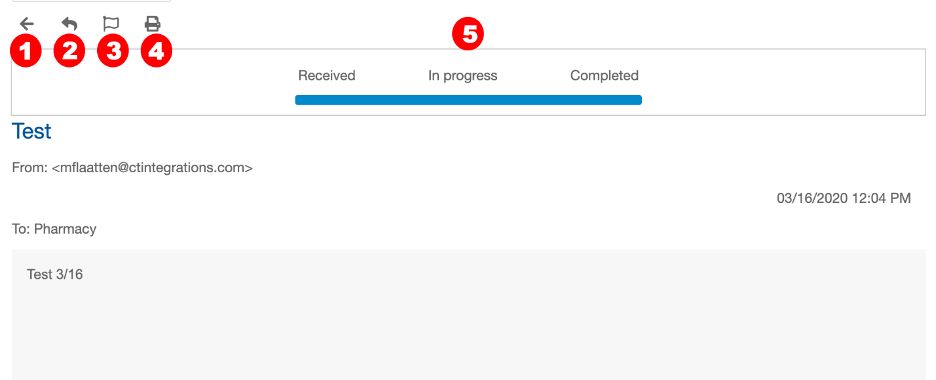
Back Button: Takes you back to the folder list view.
Reply: Allows you to respond to the email.
Flag: Flags the email.
Print: Prints the email.
Status: Shows the status of the email after it has been sent. The following are what each of the statuses mean: Received: The contact center has received the email. This does not mean that the email is owned by the agent. In Progress – The agent is actively working this email. The email is owned by an agent and in either active or suspended mode. Completed – Indicates the contact center has completed their task, they may have replied but not necessarily. The email will only show completed when closed by an agent.